Introduction to APA Cover Page:
If you are writing an academic APA Cover Page, chances are high that you will need to follow APA formatting. One of the very first things your instructor, professor, or institution will look at is your APA cover page. It may seem like a simple page with just a few lines of text, but in reality, it sets the tone for your entire paper.
The APA cover page is not just about putting your title and name on top of a blank sheet. It follows specific guidelines defined by the American Psychological Association in the Publication Manual of the American Psychological Association. If you do not format it properly, even a well-written paper can lose marks.
In this detailed guide, I will walk you through everything you need to know about creating a perfect APA cover page. We will cover student vs. professional formats, step-by-step instructions, formatting rules, common mistakes, and expert-level tips that will help your paper look polished and credible.
Let’s dive in.
Understanding What an APA Cover Page Is
An APA cover page, also known as a title page, is the first page of your academic paper written in APA format. It provides essential information about your work in a clean and structured manner. Think of it as the introduction before the introduction.
The purpose of the cover page is straightforward: it identifies your paper. It tells the reader what the paper is about, who wrote it, which institution it belongs to, and sometimes who supervised it. This is especially important in academic and professional research environments where documentation and organization matter.
According to the 7th edition of the American Psychological Association, there are two types of APA title pages:
- Student title page
- Professional title page
Most high school and university students will use the student title page format. The professional version is typically used for journal submissions, research publications, or manuscripts prepared for academic publishing.
Understanding which format you need is the first step. Many students lose marks simply because they use the professional format when their instructor expects the student version, or vice versa.
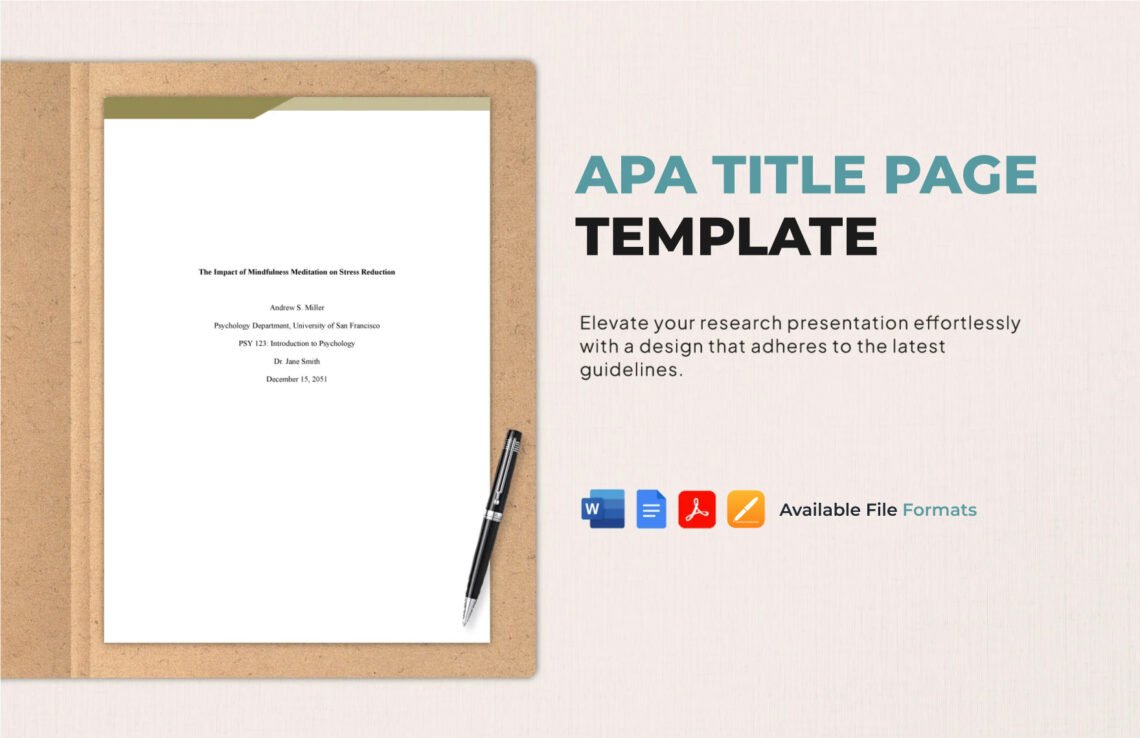
Student APA Cover Page Format (7th Edition)
The student version of the APA cover page is the most commonly used format in colleges and universities. It is straightforward, but precision matters.
1. Paper Title
The title of your paper should be bold, centered, and positioned about three to four lines down from the top of the page. It should be written in title case, meaning major words are capitalized.
Avoid writing your title in all caps. Do not underline it. Do not italicize it. Just bold and center it.
Your title should clearly describe your topic. It should not be vague. For example, instead of writing “Psychology Paper,” you could write something like “The Impact of Social Media on Adolescent Mental Health.”
A strong title immediately tells the reader what to expect. It also makes your paper look more professional and well thought out.
2. Author Name
Below the title, write your full name. Do not include titles like Mr., Mrs., Dr., or any degrees. Just your first name, middle initial (if applicable), and last name.
For example:
Arman A. Arain
Make sure the name matches the one registered with your institution. Consistency matters in academic documentation.
3. Institutional Affiliation
Below your name, write the name of your institution. This is typically your college or university name.
For example:
Department of Psychology
University of Karachi
Do not abbreviate the institution unless it is commonly recognized that way and permitted by your instructor.
4. Course Information
The next lines should include:
- Course number and name
- Instructor’s name
- Assignment due date
For example:
PSY 101: Introduction to Psychology
Professor Ahmed Khan
February 26, 2026
All text on the title page should be double-spaced. The entire page uses 1-inch margins and a readable font such as 12-point Times New Roman, 11-point Calibri, or 11-point Arial.
Professional APA Cover Page Format
The professional APA cover page is more detailed and slightly more complex than the student version. It is used for journal submissions and formal research papers.
The biggest difference between student and professional title pages is the inclusion of a running head and author note.
1. Running Head
A running head is a shortened version of your title (usually 50 characters or fewer). It appears in the header at the top of the page, aligned to the left. The page number appears on the right.
In the 7th edition APA format, the words “Running head:” are no longer required. You simply write the shortened title in all caps.
For example:
IMPACT OF SOCIAL MEDIA
On the right side:
1
This formatting detail is essential in professional submissions.
2. Author Note
The author note appears at the bottom of the title page. It may include:
- ORCID iD
- Author affiliation details
- Acknowledgments
- Conflict of interest statements
- Contact information
This section is rarely required for student papers, but it is standard in research publishing.
3. Multiple Authors and Affiliations
If there are multiple authors, their names should be separated by commas, with “&” before the final author. Each author’s institutional affiliation may be listed accordingly.
Accuracy and clarity are critical here, especially when submitting to academic journals.
Formatting Rules You Must Follow
Now let’s talk about formatting details that many students overlook.
Double Spacing
Everything on the APA cover page must be double-spaced. There should be no extra spacing between sections.
Font Style
APA 7th edition allows several font options, including:
- 12-point Times New Roman
- 11-point Calibri
- 11-point Arial
- 10-point Lucida Sans Unicode
- 11-point Georgia
Choose one and use it consistently throughout your paper.
Margins
Use 1-inch margins on all sides of the page. Do not adjust margins to make your title look centered differently. APA formatting is strict about margin consistency.
Page Number
The page number should appear in the top-right corner. The title page is always page 1.
These small details may seem minor, but in academic writing, precision signals professionalism.
Common Mistakes Students Make
Even experienced students make errors on their APA cover pages. Let’s go through some of the most common ones.
Using Incorrect Title Formatting
Students often:
- Write the title in all caps
- Forget to bold the title
- Italicize the title unnecessarily
Remember: bold, centered, title case.
Forgetting Double Spacing
Many students accidentally single-space certain lines. This creates inconsistency and does not follow APA standards.
Confusing Student and Professional Formats
Some students add a running head when it is not required. Others forget the page number. Always confirm which version your instructor expects.
Adding Unnecessary Information
Do not include:
- Student ID (unless required)
- Word count (unless required)
- Decorative elements
- Logos or images
APA formatting is clean and minimalistic.
Why the APA Cover Page Actually Matters
You might be wondering: does a cover page really matter that much?
The answer is yes.
First impressions count. Instructors often form an initial opinion about your attention to detail based on formatting. A perfectly formatted cover page suggests that you care about accuracy and professionalism.
Second, academic writing is about following standardized systems. The APA format ensures consistency across research papers worldwide. By following APA guidelines, you demonstrate that you understand academic conventions.
Finally, proper formatting reduces confusion. Clear documentation allows readers to focus on your ideas rather than being distracted by structural errors.
Step-by-Step Guide to Creating an APA Cover Page
Let’s simplify everything into a practical checklist.
- Open a new blank document.
- Set margins to 1 inch on all sides.
- Choose an approved font (e.g., 12-point Times New Roman).
- Insert page number in the top-right corner.
- Center your cursor about 3–4 lines down.
- Type your title in bold and title case.
- Press Enter (double-spaced).
- Add your name.
- Press Enter.
- Add your institutional affiliation.
- Press Enter.
- Add course name and number.
- Press Enter.
- Add instructor’s name.
- Press Enter.
- Add due date.
Review everything carefully before submitting.
Expert Tips for a Polished APA Cover Page
Now let’s go beyond the APA Cover Page.
Craft a Strong, Specific Title
Avoid generic titles. A strong academic title is precise and descriptive. It should reflect the scope of your research clearly.
Proofread Carefully
Spelling errors on a cover page are embarrassing. Double-check names, course codes, and dates.
Stay Updated
APA guidelines can change. Always ensure you are using the 7th edition rules from the American Psychological Association.
Match the Rest of the Paper
Formatting should be consistent from the title page to the references section. Font, spacing, and margins must remain uniform throughout.
Conclusion:
The APA cover page may look simple, but it carries significant academic weight. It reflects your understanding of formatting standards and your commitment to professional presentation.
By following the guidelines outlined in the Publication Manual of the American Psychological Association, you ensure that your paper meets global academic standards.
Take your time. Follow the structure carefully. Double-check formatting details. When done correctly, your APA cover page will look clean, professional, and impressive.
Mastering this skill once will benefit you throughout your academic journey — whether you are writing short assignments, major research papers, or even preparing professional publications in the future.
And remember, academic success is not just about strong ideas — it is also about presenting those ideas correctly.